Logos Bible
- 4.8
- Rating
- 1.00M
- Installs
- Free
- Price

 Analysis by App-foxy
I approached Logos: Deep Bible Study as more than a Bible-reading app. Faithlife presents it as a tool for research, sermon planning, and Bible studies, and that description matches the way it feels in use: it is designed for people who want to move from reading a passage to asking better questions about it. The important distinction is that this is not simply a digital replacement for a printed Bible. It is a study workspace, and that makes it either unusually useful or unnecessarily involved depending on what you expect from a mobile app.
As a free Books & Reference app for Android and iOS, it is easy to try without making an immediate financial commitment. The wider platform can also include paid resources, with in-app purchases ranging from $1.99 to $164.99 per item, so I would treat the free download as an entry point rather than assuming every research resource is included. That distinction matters when you compare it with a simple Bible reader that focuses on reading plans, bookmarks, and daily reminders.
How I Would Decide Whether Logos Fits
My first question would be simple: do you want to read the Bible, or do you want to investigate it? If your main habit is opening a passage for a few quiet minutes, a lightweight Bible app may feel faster and calmer. If you regularly compare translations, prepare a lesson, examine a difficult passage, or try to understand how a theme develops across Scripture, Logos has a much stronger case.
You May Also Like

 Blood Strike: 2.5 Anniversary
Blood Strike’s Loadouts Turn Every Drop Into a Tactical Gamble
A close look at Blood Strike’s custom loadouts: how fast access to signature weapons reshapes its battle royale rhythm, rewards preparation, and narrows the gap between fights.

 Pandora - Music & Podcasts
Pandora’s Music Is Easy to Start, but Harder to Recover
Pandora’s strength is its low-effort path from a seed to a station. Its weak spot is how much confidence it asks you to place in connection, setup, and quiet recovery.

 8 Ball Pool
 Is Built on Rivalries, Rematches, and Routine
A close look at the rivalries, rematches, shared routines, and unanswered safety questions that turn a quick pool match into a persistent mobile community.

 Samsung Music
’s Quiet Strength Is Playing What You Already Own
Its reach comes less from spectacle than from dependable access to a personal library. That simplicity is both the app’s strongest retention engine and its ceiling.

 AccuWeather: Weather Radar
AccuWeather Review: A Quick, Clear Forecast for Everyday Decisions
For everyday plans, the best forecast is the one you can understand quickly. AccuWeather makes rain timing, radar, and local conditions easy to act on, with a few trade-offs.

 Hill Climb Racing
Why Hill Climb Racing Still Turns Crashes Into One More Run
A tiny car, a bumpy hill and one more upgrade: Hill Climb Racing keeps resurfacing because its simple chaos makes every near-miss feel personal.
More From Our News Desk



The app is aimed at several kinds of users at once. A pastor can use it while shaping a sermon. A small-group leader can prepare discussion material. A student can follow references and examine a passage from several angles. A curious reader can use it to move beyond a quick search result. Those roles overlap, but they do not all need the same depth. I found the app most convincing when I had a specific question to answer rather than when I simply wanted to read without interruption.
There is also a question of patience. Research tools reward users who are willing to learn where things are and how the different parts connect. Someone who expects every action to be obvious from the first tap may find the experience busy. That is not necessarily a flaw in the app’s purpose, but it is a real part of the decision. The more ambitious the study task, the more worthwhile the extra complexity becomes.
Reading is only the starting point
A useful way to think about Logos is as a set of connected paths. You begin with a biblical passage, then follow references, search terms, notes, or related resources. This approach is more valuable than a basic keyword search because it encourages you to investigate context instead of stopping at the first result.
For example, when I am preparing to lead a discussion, I do not only need the wording of the selected passage. I also want to see how the surrounding section develops, whether related passages change the emphasis, and which questions are likely to confuse the group. A research-oriented app helps me organize that process in one place. It does not replace careful interpretation, but it reduces the need to jump between unrelated tools.
That last point is one of the app’s less obvious strengths. The benefit is not just access to information; it is the ability to keep a line of investigation together. I can start with a verse, follow a theme, make a note about a possible teaching point, and return later without rebuilding the entire trail from memory. For serious study, that continuity can save more time than a flashy reading feature.
Where it is strongest for sermon and group preparation
Faithlife has clearly built this app with teaching workflows in mind. I would use it before a sermon to separate three tasks that are easy to mix together: understanding the passage, deciding what it means for the audience, and planning how to communicate it. Keeping those stages distinct helps prevent a familiar interpretation from taking over before I have paid attention to the text itself.
For a Bible study group, the app is useful when preparation involves more than finding a few discussion questions online. I can read the passage in context, investigate repeated words or ideas, and make notes about points that deserve clarification. A practical tip is to prepare two layers of notes: one for observations that stay close to the text, and another for questions that invite conversation. That separation makes the final session less like a lecture and more like a guided discussion.
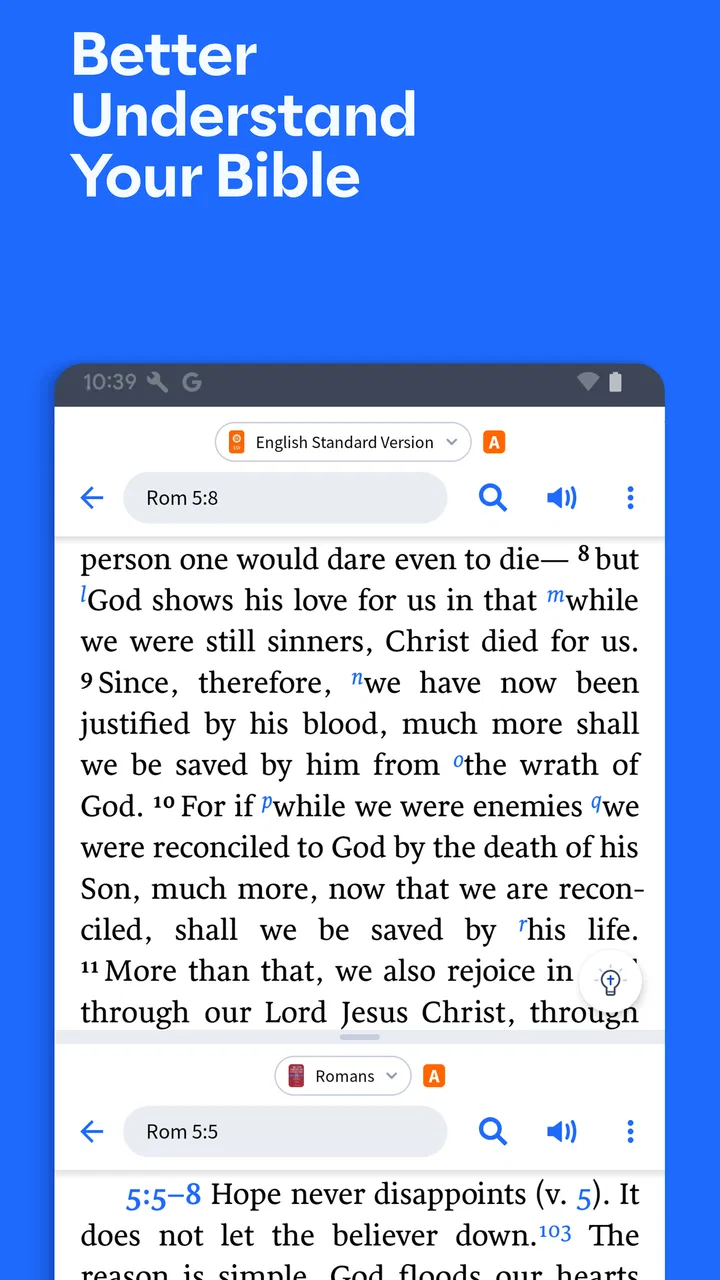
Another worthwhile workflow is to prepare on a larger screen when possible and use the mobile app for review. The phone is convenient for checking a reference, revisiting a note, or reading during a spare moment, but extended comparison can feel cramped. I would not choose a mobile-only setup for every major study project. The app travels well, yet serious research benefits from room to see relationships between several pieces of information.
Small habits that make the experience better
I recommend beginning with a single study goal instead of opening every available tool at once. For instance, decide whether you are tracing a theme, understanding a paragraph, preparing a lesson, or collecting personal notes. This prevents the research process from turning into endless browsing. Logos can support broad exploration, but discipline still has to come from the user.
It is also worth creating a consistent note-taking habit from the beginning. A note that merely says “interesting” will not help much a week later. I would record the passage, the question that prompted the note, and the conclusion I reached. That small structure turns the app into a continuing study record instead of a temporary collection of highlights.
A third tip is to test your normal routine before committing to a large library or paid resource. Since individual purchases can become substantial, I would first identify the kinds of material I actually use. Someone who mostly reads and compares passages may not need the same resources as a pastor building a long-term research workflow. The app’s flexibility is valuable, but flexibility can also encourage unnecessary buying.
Where Logos Wins, and Where Another App May Be Better
I find the clearest way to judge this section is to ask whether deeper study is a regular need or an occasional curiosity. Logos is at its best when a passage leads me into connected research and preparation; a simpler reader may be more comfortable when I only want a quiet, uninterrupted reading session. That difference also helps explain what keeps the app useful after the first burst of exploration.
The advantage over a basic Bible reader
Compared with a conventional Bible app, Logos feels more like a research desk than a reading lamp. A basic reader usually wins on speed and simplicity: open it, choose a book, read, and close it. Logos wins when the next question matters as much as the current verse. Its purpose is not to make every session minimal; it is to make deeper investigation more manageable.
I especially appreciate that distinction for passages that seem clear at first but become more complicated in context. A simple reader may give me the text and perhaps a search box. A study platform encourages me to examine connections and record what I discover. That is a meaningful difference for anyone who teaches, writes, or wants to develop a more deliberate reading habit.
The trade-off is that Logos can feel like too much app for a short devotional routine. If you want a clean screen, a daily plan, and almost no setup, a simpler alternative is probably the better choice. I would not recommend choosing a research platform merely because it offers more tools. More tools help only when they match the way you study.
The advantage over browser searching
Searching the web is quick, but it often scatters the process across pages, tabs, and sources with different levels of reliability. Logos gives a more focused environment for Bible research. The practical benefit is not that every search becomes effortless; it is that the work is less fragmented. I can stay with the passage and build understanding around it rather than repeatedly losing my place.
There is a subtle trade-off here. Web searching is excellent for discovering broad background information and viewpoints outside a dedicated Bible-study environment. Logos is better when I want a structured, passage-centered workflow. I would use the app for close study and planning, while still recognizing that no single tool should replace reading widely or thinking critically.
Who should probably skip it
I would steer away from Logos if you want only a quick daily reading experience and have no interest in research features. The app may feel unnecessarily elaborate for someone who rarely follows references, prepares lessons, or takes study notes. It may also frustrate users who prefer to keep all Bible reading completely offline in a very simple interface, depending on how they expect their resources and workflow to behave.
I would also be cautious if you are likely to purchase resources impulsively. The free starting point is appealing, but the available purchase range means the platform can become more expensive than a basic reader. That is not a reason to avoid it; it is a reason to decide in advance what problem you are trying to solve. A clear research need makes the investment easier to judge.
What switching really involves
Moving from a simple Bible app to Logos is not just a matter of installing another reader. You are changing habits. Instead of opening the app only to read, you may begin organizing notes, following references, and returning to earlier research. I would give myself a few sessions to learn the layout before deciding whether it is a good fit. The first impression can be less important than whether the workflow becomes natural after repeated use.
The cost of switching is highest for people who already have a carefully organized system elsewhere. If your notes live in another app or in a paper study Bible, transferring everything may not be worth the effort. In that situation, I would start with one active project rather than attempting to rebuild years of material. Use Logos for a current sermon, course, or group study, then judge whether its organization genuinely improves your work.
For a new user, the best starting project is small and concrete. Choose one passage, investigate it, write a few useful notes, and return to them later. That test reveals more than browsing the feature list. You will quickly learn whether the app’s depth helps you think or simply creates more places to look.
Everyday scenarios where the choice becomes clear
Imagine that I am leading a small group on a weekday evening. During lunch, I open the selected passage, read beyond the few verses assigned, trace a related idea, and write down two questions that invite people to explain the text in their own words. Later, I review those notes on my phone before the meeting. In that situation, Logos is doing something a basic reader would struggle to do comfortably: keeping reading, investigation, and preparation connected.
Now imagine a different morning. I have five quiet minutes, want to read a short passage, and do not plan to research anything. A simpler Bible app may be more pleasant because it gets out of the way. The important lesson is that Logos is not automatically the best option for every Bible moment. Its value rises with the complexity of the question.
For personal study, I would use it when I want to notice patterns over time. A helpful approach is to keep notes focused on observations rather than trying to write a complete interpretation immediately. Later, those observations can support a more careful conclusion. This is one of the app’s strongest uses for a motivated reader: it can encourage a slower, more accountable process.
Platform details and practical expectations
The app has been available since July 15, 2011, and its current version is 51.0.0. It requires at least iOS or Android 12, so I would check the operating system on an older phone or tablet before planning a switch. It is rated for Everyone, which makes it broadly approachable from an age-rating perspective, although the depth of the study workflow is aimed more at serious readers than at very young children.
Its average rating is 4.8 from around fifty-five thousand ratings, with roughly sixteen thousand written reviews, and it has passed one million installs. Those figures suggest that the app has found a substantial audience, but they do not remove the need to match it to your own habits. A highly rated research tool can still feel wrong if your priority is simplicity, while a more demanding app can be exactly right for someone preparing sermons every week.
Because it is free to install, I think the sensible approach is to evaluate the basic experience before spending money. Pay attention to how quickly you can locate a passage, whether notes fit your thinking style, and whether the research path feels helpful rather than distracting. Only after that should you consider expanding what you use inside the platform.
My recommendation for different kinds of readers
I recommend Logos to pastors, teachers, Bible-study leaders, students, and committed readers who want a connected way to research Scripture. It is particularly worthwhile when your questions regularly go beyond “what does this passage say?” and become “how does this connect, what should I investigate next, and how can I explain it clearly?” In those situations, the app’s depth is a genuine advantage.
I would recommend it more cautiously to casual readers. Try it if you are curious about deeper study, but do not feel obligated to replace a simpler app that already supports your routine. The best tool is the one you will actually open and use consistently. Logos can support a serious habit, but it cannot create one by itself.
My overall view is favorable because the app understands that Bible study is often a process rather than a single search. It gives me a place to move from passage to question, from question to research, and from research to notes that remain useful later. The friction is real: the interface can feel busy, deeper resources may involve purchases, and a phone screen is not always ideal for extended comparison. Still, for readers who want research, sermon planning, or group-study preparation in one focused environment, this is a strong free starting point with room to grow.
If I were recommending it to a friend, I would say this: install it when you are ready to study with a purpose, not merely when you want another place to read. Begin with one passage, keep your notes disciplined, and resist buying resources until you know what your workflow needs. For that kind of user, Logos: Deep Bible Study is more than a reference app; it becomes a practical companion for thoughtful, ongoing study.
FAQs for Logos Bible
01What features does Logos: Deep Bible Study offer?
Logos: Deep Bible Study offers a comprehensive suite of tools for in-depth Bible study. It includes a vast library of biblical texts and resources, integrated search functions, note-taking capabilities, and customizable reading plans. The app is designed to cater to both casual readers and serious scholars, providing detailed commentaries, original language tools, and sermon prep resources.
02Is Logos: Deep Bible Study suitable for beginners?
Yes, Logos is suitable for beginners as well as advanced users. The app provides guided tutorials and easy-to-use features that help newcomers navigate its extensive resources. Beginners can start with simple reading plans and gradually explore more complex tools like interlinear Bibles and Greek or Hebrew lexicons as they become more comfortable.
03Does Logos: Deep Bible Study require an internet connection?
While Logos can function offline, many features require an internet connection. Downloaded books and personal notes can be accessed without internet, but syncing across devices, accessing the full library, and utilizing the cloud-based search functions generally require connectivity. It's recommended to download essential resources for offline study when needed.
04Are there any subscription or purchase requirements for Logos: Deep Bible Study?
Logos offers a free version with basic features, but to unlock its full potential, users may need to purchase additional resources or subscribe to higher tiers. These purchases can include extensive libraries, advanced study tools, and premium features like sermon building aids, which significantly enhance the app’s functionality.
05How does Logos: Deep Bible Study integrate with other tools or platforms?
Logos integrates seamlessly with various platforms and tools to enhance your study experience. It supports synchronization across multiple devices, ensuring your notes and resources are always up-to-date. Additionally, it can be linked with other applications like Microsoft Word for sermon preparation, making it a versatile tool for educators and church leaders.
Pros
- Comprehensive Bible study tools.
- User-friendly interface for navigation.
- Offline access to resources.
- Customizable reading plans.
- Audio Bible feature available.
Cons
- Limited free content options.
- In-app purchases can be pricey.
- Occasional sync issues.
- Heavy on device storage.
- Requires stable internet for updates.

Logos Bible
Gallery